Artificial Intelligence (AI)
This page describes the use of AI in BAO Analytics Platform (AP).
AI and LLMs
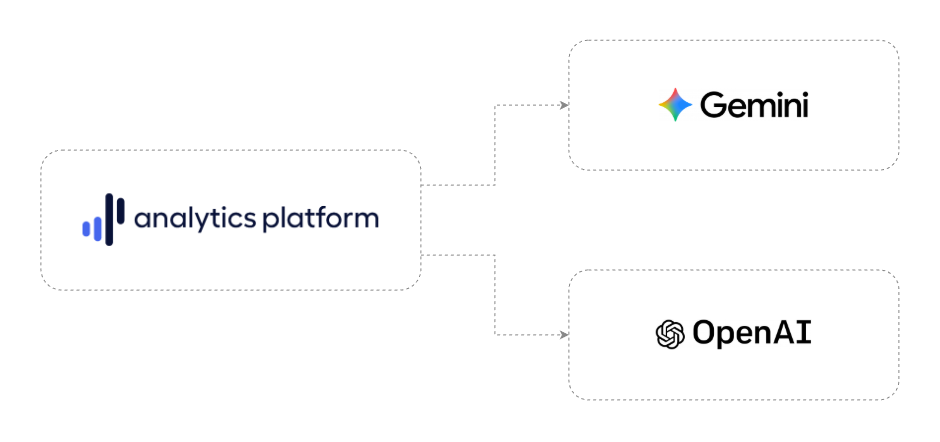
AP integrates AI, Large Language Models (LLMs) and vector search capabilities to transform natural-language instructions into production-grade data analytics. The supported AI and LLM providers are listed below.
- Google Gemini (Flash and Flash-Lite)
- OpenAI ChatGPT (GPT)
- Local model engines (Ollama and vLLM)
By incorporating foundational AI models, AP translates user intent into optimized SQL queries and executable Python or R code across both web interfaces and automated API agents.
- Text-to-SQL engine: Non-technical users can execute complex data queries within the Data browser or through the Model Context Protocol (MCP) server by asking questions in plain language. The system feeds schema metadata and prompt context to LLMs to instantly generate, validate and execute precise SQL queries.
- Text-to-script editor: Users can describe desired data science outcomes in conversational text, such as running outlier detection via modified Z-score statistical algorithms, performing linear regression forecasting, or creating lightweight API connectors. The AI-powered editor translates the prompt into fully executable Python or R code that can be run on-demand or embedded directly into automated workflows.
- Vector embeddings: AP processes natural-language prompts by generating vector embeddings and performing cosine-similarity search against specialized metadata embedding tables. This step identifies and resolves terms within user prompts, such as facility names, organizational units and health indicators, in a scalable and precise manner.
- Adaptive LLM reasoning levels: Users can toggle between Fast mode (using e.g. Gemini Flash-Lite for low-latency queries) and Thinking mode (using Gemini Flash for multi-table joins and complex statistical logic) to optimize runtime performance.
- Enterprise AI agents: AP exposes a native Model Context Protocol (MCP) server that allows external LLM agents, such as Claude and ChatGPT, to securely discover database schemas, resolve metadata terms and run analytics queries as a native extension of their reasoning processes.
The integrated AI architecture bridges the gap between complex database operations and non-technical stakeholders, driving rapid data-driven decision-making without requiring expertise in SQL query writing or Python coding.
Cloud frontier models
AP supports frontier models provided as a service in the cloud. These include the Google Gemini and OpenAI GPT families. In a multi-tenant configuration, each client (tenant) can provide their own API key and manage their own customer relationship with the cloud LLM provider, including accepting the terms of use and managing billing.
Local model engines
AP supports local model engines which provide REST APIs compatible with the OpenAI completions API. These include Ollama and vLLM. A range of LLMs are supported by these engines and by AP, including Qwen3-Coder-30B, Qwen3-32B, GPT-OSS-20B and Mistral-Small-3.2-24B. These models can be deployed in on-premise server environments, connected to AP and used as the backend for the AP conversational analytics functions.
Managed cloud models
The OpenAI completions API has become the de facto standard for LLM interaction and most cloud model providers, such as Together AI and DeepInfra, offer an OpenAI compatible API. AP offers a generic, OpenAI compatible model connector with configurable model, base URL and API key which allows for utilizing the majority of cloud model providers.
AI and data privacy
AP supports Google Gemini and OpenAI ChatGPT as AI LLM providers. AP transmits only non-sensitive metadata to LLM providers, such as data warehouse table names, column names and data types, and semantic definitions, such as names of data elements and organizational units. No data records are transmitted to the AI/LLM provider. Metadata is included in system instructions for content prompts, for purposes such as generation of SQL queries and Python code. Generated queries are executed locally within the platform using the integrated data warehouse, which means that data records never leave the hosting environment.
Examples of metadata which are transmitted to the LLM provider:
- Data warehouse table and column names
- Metadata items such as names of DHIS2 data elements and indicators
- The natural text query provided by the user
Examples of data points which are NOT transmitted to the LLM provider:
- Aggregate data values
- Individual data records
- System user information
AI and governance
AP supports reliable AI governance through transparency, traceability, logging and access control.
Explainability
AP provides full query and code transparency and plain-language interpretations, allowing users to understand the output generated by LLMs before executing it.
- Inspected script code generation: Natural language queries processed by the LLM produce human-readable Python or R code. Generated scripts are populated in the web-based script editor in AP, allowing analysts to inspect, audit, and modify the code before running it.
- Inspected SQL query generation: Natural language queries converted to SQL queries by the LLM can be inspected directly in the web-based data browser. Generated SQL queries can only read data, not make modifications or delete data, to prevent unintended changes.
- Automated query explanation: To assist non-technical stakeholders, AP includes a built-in explanation engine in the data browser that breaks down complex generated SQL queries into plain-text descriptions detailing underlying joins, aggregations and filtering logic.
- Semantic phrase search: To eliminate generative hallucinations, AP performs cosine-similarity searches using vector embeddings against a data warehouse embedding table, resolving natural text terms directly to metadata items, such as DHIS2 data elements, prior to query generation.
Traceability
AP offers end-to-end lineage and immutable audit logs, allowing system administrators to audit and monitor use of AI features and interaction with LLM providers.
- Query history log: AP automatically writes every AI-generated query to the data browser query history log, recording the requesting user, exact execution timestamp, generated SQL statement, natural text query, execution duration and output data row count.
- Workflow task audit trail: When AI-generated views or scripts are included in multi-step AP automated workflows, every run generates a permanent change log containing a unique job ID, table-level execution metrics, row counts and error statuses for complete data lineage.
- MCP lineage: AI interactions handled via the Model Context Protocol (MCP) server capture the full execution lineage, from initial prompt input and metadata search output to the returned query payload.
Governance
AP provides enforced role-based access control (RBAC), sovereign LLM provider account, sandboxing and zero model training.
- Context-aware access control: AI responses strictly respect the object-level sharing and data warehouse security model of AP. Users can only generate queries against schemas, datasets and organization unit hierarchies for which they have explicit permissions.
- Sovereign LLM account and terms ownership: For on-premise deployments, implementing organizations retain full operational and legal sovereignty by creating and managing their own enterprise accounts directly with provider platforms (e.g., Google Cloud or OpenAI). The organization manages its own billing, accepts the terms of service and maintains direct control over API key lifecycles and data processing agreements without vendor intermediary lock-in.
- Data privacy and confidentiality: All API requests sent to the LLM are transmitted via encrypted HTTPS/TLS channels. Under enterprise managed hosting policies, customer data, prompts, and metadata are never retained or used by foundation model providers for model training.
- Sandboxed compute and encrypted secrets: AI-generated Python and R scripts run in isolated backend execution environments (PyServe and RServe) with strictly managed package libraries. All platform secrets and API credentials referenced in AI-generated scripts are encrypted at rest using Google Tink (AES-128 GCM) and injected securely via AP variables, preventing exposure in plain text.
Text-to-SQL architecture
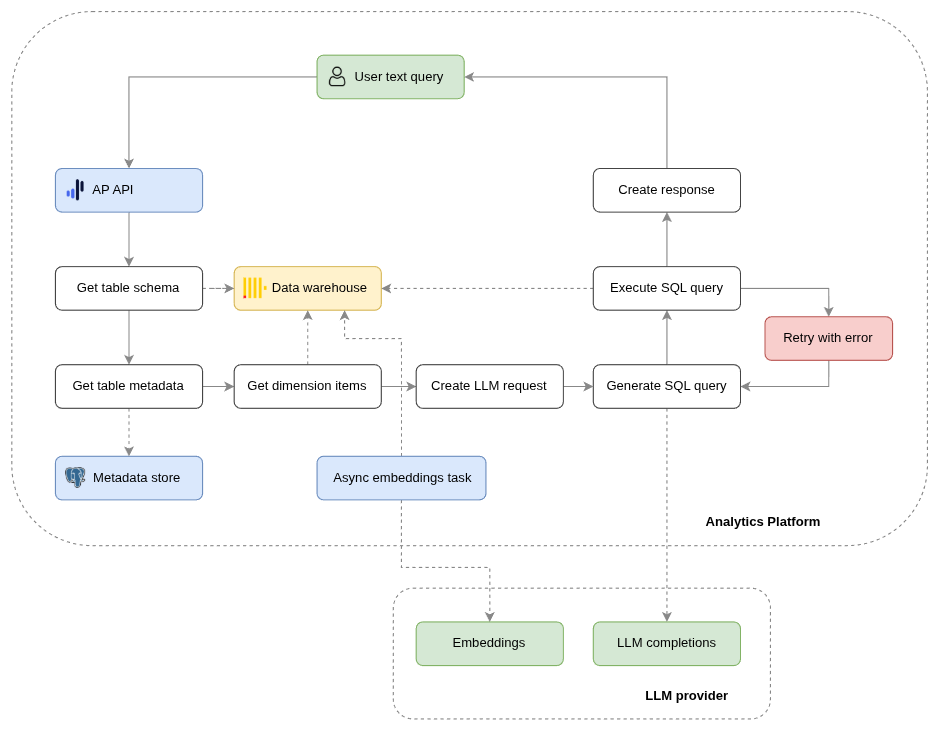
This section describes the flow of the text-to-SQL solution in AP.
- User makes a data request in natural text through the AP web user interface.
- The API layer receives and deserializes the request.
- AP retrieves the data warehouse schema directly from the data warehouse. This includes schema, table and column names and data types.
- AP retrieves metadata about the relevant part of the schema. This metadata is generated from the data source application and provided by the data pipeline system. An example is data program, data element, attribute and option set metadata from a DHIS2 data source instance.
- AP composes the LLM content request with system instruction, data warehouse schema, data source metadata and user query.
- AP makes a content generation request to the LLM API and receives a SQL query.
- AP executes the SQL query.
- If the generated SQL query execution fails, AP retries the generation once. The error message is included in a new LLM content generation request.
- AP returns the data result set and the generated SQL query in an API response.
- The AP data browser user interface displays the result set and the generated SQL query to the user.