Data pipelines
Overview
The following section covers how to view, create, update and remove data pipelines.
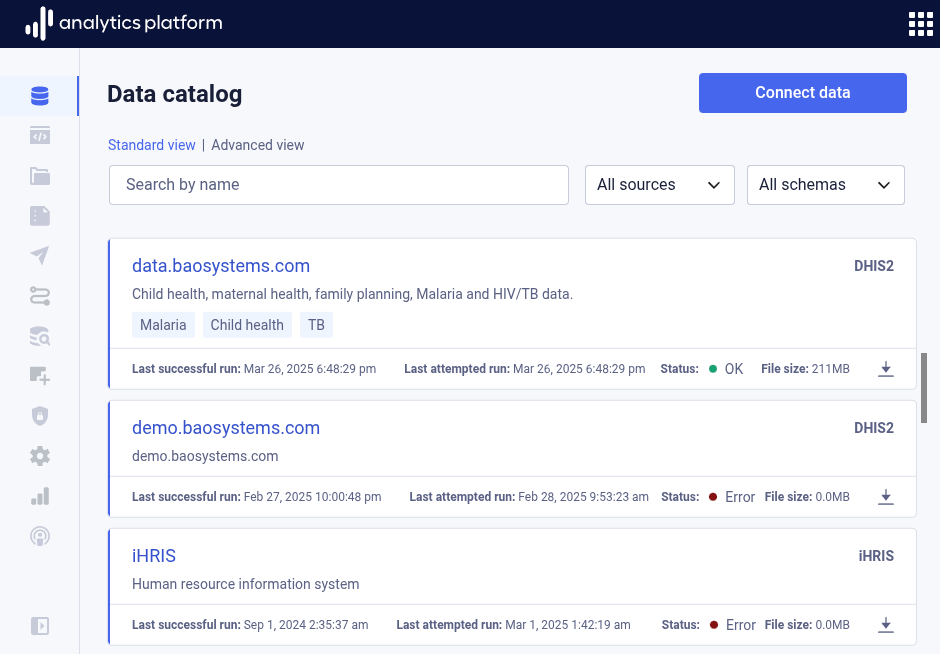
View data pipeline
- Click Data catalog in the left-side menu to view all data pipelines.
- Click the name of a data pipeline to view more information.
Create data pipeline
The starting point for creating a new data pipeline is the data catalog. The data catalog displays the existing data pipelines, also referred to as datasets.
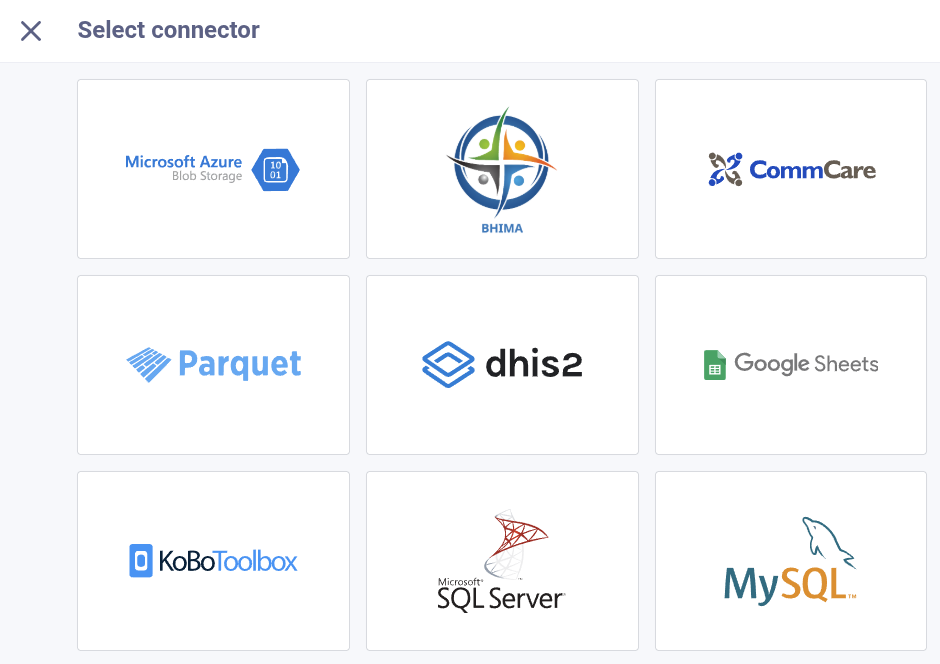
- Click Connect data from the top-right corner.
- Choose the data source for which you want to create a data pipeline.
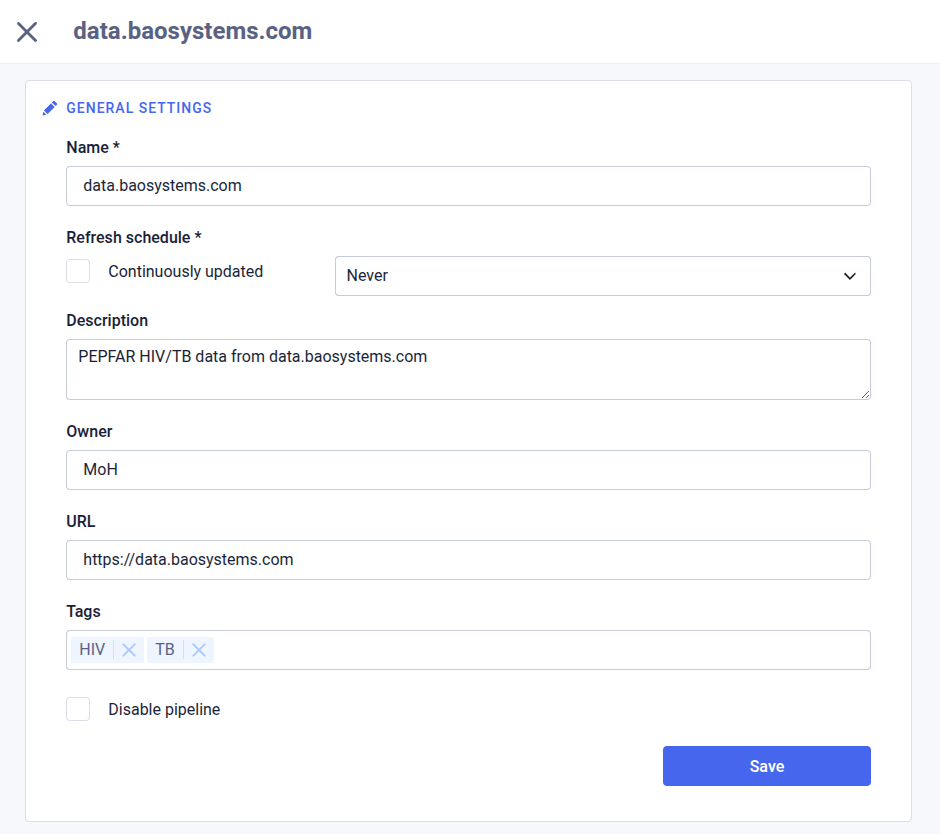
General settings
In the General settings section, enter the following information. This section is present for all data pipeline types.
| Field | Description |
|---|---|
| Name | The name of the data pipeline (required) |
| Refresh schedule | The interval for when to refresh data from the data source (required) |
| Description | A description of the data pipeline |
| Owner | The owner of the source data or system |
| URL | A URL to the source data or system |
| Tags | Free text tags which categorizes the source data |
| Disable pipeline | Whether to disable loading of source data |
| Reference | A reference text for the data source |
| Link to source | A URL refering to information about the data source |
| Link to terms of use | A URL refering to terms of use for the data source |
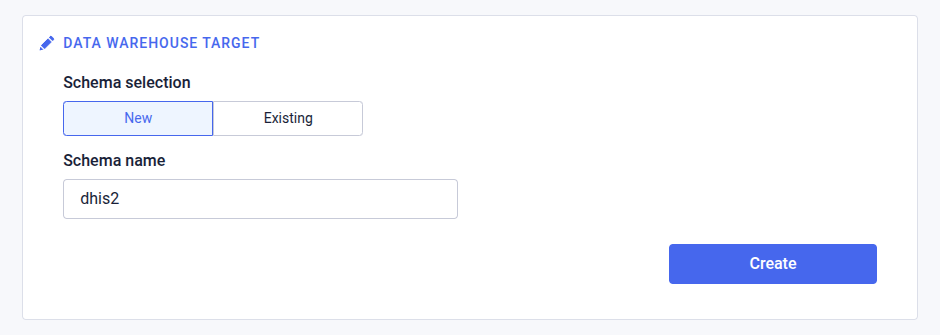
Data warehouse target
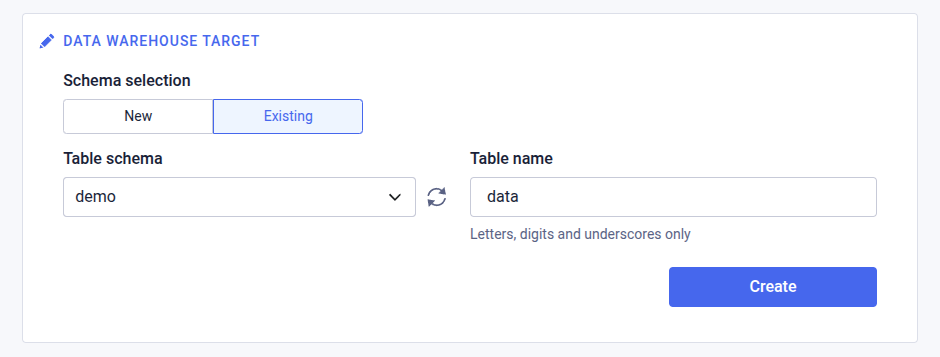
In the Data warehouse enter the following information. This section appears last of all sections, and is present for all data pipeline types.
There are two options to select from for specifying the data warehuouse target.
New schema
By selecting new schema, a dedicated, new schema will be created for the data pipeline, and the data pipeline will create and populate tables in the new schema.
| Field | Description |
|---|---|
| Schema name | The name of the schema to create |
Existing schema
By selecting existing schema, the selected schema will be used, and the data data pipeline will create and populate tables in the existing schema. A base table name will be used as a prefix to all tables created by the data pipeline, to distinguish the tables from any other tables with same names.
| Field | Description |
|---|---|
| Table schema | The existing data warehouse schema in which to create tables |
| Table name | The table name, or for multi-table data pipelins, the base name for all tables |
The following section describes steps for creating each type of data pipeline.
BHIMA
| Topic | Value |
|---|---|
| Connection | Web API |
| Authentication | API username/password |
| Data model | Project |
Connection
| Field | Description |
|---|---|
| URL | The URL for the BHIMA instance |
| Username | Username for the BHIMA account |
| Password | Password for the BHIMA account |
| Project | Project for which to exchange data |
Settings
Stock usage
| Field | Description |
|---|---|
| Depot | The depot to load data for |
| Inventory | The inventory to load data for |
| Avg consumption algorithm | The algorithm to use for average consumption calculation |
| Monthly interval | The monthly interval |
Stock satisfaction rate
| Field | Description |
|---|---|
| Start date | Start date for satisfaction rates |
| End date | End date for satisfication rates |
| Depots | Depots |
CommCare
| Topic | Value |
|---|---|
| Connection | Web API |
| Authentication | API username/token |
| Data model | Application and form |
Settings
| Field | Description |
|---|---|
| Domain | The domain (project) to load data for |
| Application | The application to load data for |
| Hash column names | Whether to hash column names to ensure uniqueness |
DHIS2
| Topic | Value |
|---|---|
| Connection | Web API and database connection |
| Authentication | API token, API username/password, database username/password |
| Data model | Aggregate data, program, event and enrollment |
Web API
| Field | Description |
|---|---|
| Base URL to web API | Base URL to web API for DHIS2 instance, do not include /api |
| Username | Username for DHIS2 user account |
| Password | Password for DHIS2 user account |
Database
Providing a database connection URL and credentials will drastically improve performance, and is required to load enrollment and event data. If a database connection cannot be provided, the database section can be skipped, and the data pipeline will work with an API connection only. For the API connection, only metadata, data set completness and aggregate data are supported.
| Field | Description |
|---|---|
| Hostname | The hostname to the PostgreSQL DHIS2 database server, do not include a protocol prefix |
| Port | Port number to the database server, default is 5432 |
| SSL | Whether to enable SSL encryption for the database connection |
| Trust server certificate | Whether to trust the server SSL certificate for the database connection |
| Database name | The name of the database |
| Database username | The username of the database user |
| Database password | The password of the database user |
Data types
The data types section provides selections for the data types to load.
| Field | Description |
|---|---|
| Metadata | Include metadata, always enabled |
| Aggregate data | Include aggregate data values and complete data set registrations |
| Program | Include events and enrollments, use the drop-down to specify which programs to include, or leave the drop-down blank to include all current and future programs |
| User | Include user, user groups and user roles, excluding user passwords and secrets |
| Usage statistics | Include usage statistics |
| Data store | Include data store, including namespaces, keys and JSON values |
| File resource | Include file resources |
| Audit | Include metadata audit |
Data filters
The data filters section provides filters for the data to load. All filters are optional.
| Field | Description |
|---|---|
| Data element groups | The data element groups to include |
| Data elements | The data elements to include |
| Organisation units | The organisation units to include |
| Data sets | The data sets to include |
| Period last time unit | The last time periods of the specified unit to load |
| Include soft deleted data | Whether to include soft deleted data records |
| Skip wide aggregate data table | Whether to skip the wide aggregate data table |
| Include zero data values | Whether to include zero data values |
| Include narrow event table for programs | Whether to include narrow event table for programs |
| Include change log tables | Whether to include change log tables for event and enrollment programs |
| Include embeddings | Whether to include a metadata embeddings table used to improve text-to-SQL |
FHIR
The FHIR data pipeline allows for retrieving information, typically related to electronic health records.
Learn more about FHIR in general at fhir.org and FHR development at build.fhir.org.
| Topic | Value |
|---|---|
| Connection | Web API |
| Authentication | API username/password |
The following FHIR resources are supported.
| Resource | Documentation |
|---|---|
| Code system | build.fhir.org/codesystem.html |
| Condition | build.fhir.org/condition.html |
| Encounter | build.fhir.org/encounter.html |
| Location | build.fhir.org/location.html |
| Medication | build.fhir.org/medication.html |
| Observation | build.fhir.org/observation.html |
| Organization | build.fhir.org/organization.html |
| Patient | build.fhir.org/patient.html |
| Person | build.fhir.org/person.html |
| Practitioner | build.fhir.org/practitioner.html |
| Questionnaire | build.fhir.org/questionnaire.html |
| Questionnaire response | build.fhir.org/questionnaireresponse.html |
| Value set | build.fhir.org/valueset.html |
Settings
| Field | Description |
|---|---|
| Questionnaires | The questionnaires to include |
Global Health Observatory
The Global Health Observatory (GHO) data pipeline allows for retrieving indicators and datasets from the GHO public data portal.
| Topic | Value |
|---|---|
| Connection | Web API |
| Authentication | None, publicly available |
| Data model | Indicator, dimension, dimension value and data |
Settings
| Field | Description |
|---|---|
| Indicators | The indicators to load data for |
UNICEF Data
The UNICEF Data data pipeline allows for retrieving indicators and datasets from the UNICEF Data portal based on the SDMX standard.
| Topic | Value |
|---|---|
| Connection | Web API |
| Authentication | None, publicly available |
| Data model | Data flow, data structure, dimension, code list, data set |
Settings
| Field | Description |
|---|---|
| Data flows | The SDMX data flows to load data for |
| Start period | The start year of the time range to load data from |
| End period | The end year of the time range to load for |
World Bank Open Data
The World Bank Open Data data pipeline allows for retrieving indicators and datasets from the World Bank Open Data portal.
| Topic | Value |
|---|---|
| Connection | Web API |
| Authentication | None, publicly available |
| Data model | Indicator and data |
Settings
| Field | Description |
|---|---|
| Indicators | The indicators to load data for |
Google Sheets
The Google Sheets data pipeline allows for retrieving data from a Google Sheet and loading it into the AP.
To connect to a Google Sheet, the first step is to share the sheet with the AP service account email. The service account email address is: google-sheets@dharma-prod.iam.gserviceaccount.com.
To share the file in Google Drive:
- Right-click the Google Sheet document and click Share > Share.
- In the Add people, groups and calendar events field, enter the service account email address:
google-sheets@dharma-prod.iam.gserviceaccount.com. - Set the permission to Viewer.
- Click Send.
After sharing the sheet, get the URL to the sheet in the share dialog by clicking Copy link.
| Topic | Value |
|---|---|
| Connection | Web API |
| Authentication | File shared with service account email |
| Data model | Sheet |
Connection
| Field | Description |
|---|---|
| URL | URL to sheet shared with service account email |
Settings
| Field | Description |
|---|---|
| Schema | Sheets in JSON format |
The schema is a JSON array with one object per sheet. Each object has the following properties:
| Property | Description |
|---|---|
| sheetName | The name of the sheet in Google Sheets. Ensure this matches the exact sheet name in the Google Sheets |
| ranges | An array of cell ranges in the sheet |
The ranges array has one object per range. Each object has the following properties:
| Property | Description |
|---|---|
| header | The cell range to use as column headers in the data warehouse table, e.g. A1:J2. The header can span multiple rows but this will be flattened into a single column header in the data warehouse |
| data | The cell range to use as rows in the data warehouse table, e.g. A3:J100 |
Note
The header and data ranges must have the same number of columns.
Example schema
[
  {
    "sheetName": "ANC Data January 2025",
    "ranges": [
      {
        "header": "A1:J2",
        "data": "A3:J100"
      },
      {
        "header": "A120:P121",
        "data": "A122:P200"
      }
    ]
  },
  {
    "sheetName": "TB Data January 2025",
    "ranges": [
      {
        "header": "A1:D1",
        "data": "A2:D100"
      }
    ]
  }
]
iHRIS
| Topic | Value |
|---|---|
| Connection | Database (JDBC) |
| Authentication | Database username/password |
| Data model | Form |
MySQL database
| Field | Description |
|---|---|
| Hostname | The hostname for the iHRIS database |
| Port | The port for the iHRIS database, often 3306 |
| SSL | Whether to enable SSL encryption for the database connection |
| Trust server certificate | Whether to trust the server SSL certificate for the database connection |
| Database name | The name of the database |
| Database username | The username of the database user |
| Database password | The password of the database user |
Settings
| Field | Description |
|---|---|
| Forms | The forms to load data for |
| References | The references to load data for |
| Include record history | Whether to load record history |
Kobo Toolbox
| Topic | Value |
|---|---|
| Connection | Web API |
| Authentication | API token |
| Data model | Survey |
Connection
| Field | Description |
|---|---|
| URL | URL to Kobo instance |
| Auth token | Authentication token for Kobo user account |
Settings
| Field | Description |
|---|---|
| Survey | The survey to load data for |
ODK
| Topic | Value |
|---|---|
| Connection | Web API |
| Authentication | API username/password |
| Data model | Project and form |
Connection
| Field | Description |
|---|---|
| URL | URL to ODK instance |
| Username | Username for ODK user account |
| Password | Password for ODK user account |
Settings
| Field | Description |
|---|---|
| Project | The project to load data for |
| Form | The form to load data for |
Ona
| Topic | Value |
|---|---|
| Connection | Web API |
| Authentication | API token |
| Data model | Form |
Connection
| Field | Description |
|---|---|
| URL | URL to Ona instance |
| Auth token | Authentication token for Ona user account |
Settings
| Field | Description |
|---|---|
| Form | The form to load data for |
Talamus
| Topic | Value |
|---|---|
| Connection | Web API |
| Authentication | API token |
| Data model | Facility |
Connection
| Field | Description |
|---|---|
| URL | URL to Kobo instance |
| Auth token | Authentication token for Kobo user account |
Settings
| Field | Description |
|---|---|
| Facilities | The facilities to load data for |
| Start date | The start date of the time range to load data for |
| End date | The end date of the time range to load data for |
Amazon S3
Amazon S3 refers to files as objects.
| Topic | Value |
|---|---|
| Connection | Web API |
| Authentication | Access key/secret key |
| Data model | Bucket and object |
Source
| Field | Description |
|---|---|
| Bucket | The bucket name |
| Object key | The key for the object to load |
| Access key | The IAM access key |
| Secret key | The IAM secret key |
Azure Blob Storage
Azure Blob Storage refers to files as blobs.
| Topic | Value |
|---|---|
| Connection | Web API |
| Authentication | Connection string |
| Data model | Container and blob |
Source
| Field | Description |
|---|---|
| Container name | The container name |
| Blob path | The path to the blob to load |
| Connection string | The connection string for the container |
ClickHouse
| Topic | Value |
|---|---|
| Connection | Database (JDBC) |
| Authentication | Database username/password |
| Data model | Table |
ClickHouse
| Field | Description |
|---|---|
| Hostname | The hostname for the database |
| Port | The port for the database, often 8123 or 8443 for SSL |
| SSL | Whether to enable SSL encryption for the database connection |
| Trust server certificate | Whether to trust the server SSL certificate for the database connection |
| Database name | The name of the database |
| Database username | The username of the database user |
| Database password | The password of the database user |
SQL Server
| Topic | Value |
|---|---|
| Connection | Database (JDBC) |
| Authentication | Database username/password |
| Data model | Table |
SQL Server
| Field | Description |
|---|---|
| Hostname | The hostname for the database |
| Port | The port for the database, often 1433 |
| SSL | Whether to enable SSL encryption for the database connection |
| Trust server certificate | Whether to trust the server SSL certificate for the database connection |
| Database name | The name of the database |
| Database username | The username of the database user |
| Database password | The password of the database user |
Data source
| Field | Description |
|---|---|
| SQL query | The SQL query for retrieving data to load |
| Tables | The database tables to load |
MySQL
| Topic | Value |
|---|---|
| Connection | Database (JDBC) |
| Authentication | Database username/password |
| Data model | Table |
MySQL
| Field | Description |
|---|---|
| Hostname | The hostname for the database |
| Port | The port for the database, often 1433 |
| SSL | Whether to enable SSL encryption for the database connection |
| Trust server certificate | Whether to trust the server SSL certificate for the database connection |
| Database name | The name of the database |
| Database username | The username of the database user |
| Database password | The password of the database user |
Data source
| Field | Description |
|---|---|
| SQL query | The SQL query for retrieving data to load |
| Tables | The database tables to load |
Oracle RDBMS
| Topic | Value |
|---|---|
| Connection | Database (JDBC) |
| Authentication | Database username/password |
| Data model | Table |
Oracle RDBMS
| Field | Description |
|---|---|
| Hostname | The hostname for the database |
| Port | The port for the database, often 1433 |
| SSL | Whether to enable SSL encryption for the database connection |
| Trust server certificate | Whether to trust the server SSL certificate for the database connection |
| Database name | The name of the database |
| Database username | The username of the database user |
| Database password | The password of the database user |
Data source
| Field | Description |
|---|---|
| SQL query | The SQL query for retrieving data to load |
| Tables | The database tables to load |
PostgreSQL
| Topic | Value |
|---|---|
| Connection | Database (psql) |
| Authentication | Database username/password |
| Data model | Table |
PostgreSQL
| Field | Description |
|---|---|
| Hostname | The hostname for the database |
| Port | The port for the database, often 1433 |
| SSL | Whether to enable SSL encryption for the database connection |
| Trust server certificate | Whether to trust the server SSL certificate for the database connection |
| Database name | The name of the database |
| Database username | The username of the database user |
| Database password | The password of the database user |
Data source
| Field | Description |
|---|---|
| SQL query | The SQL query for retrieving data to load |
| Tables | The database tables to load |
Amazon Redshift
| Topic | Value |
|---|---|
| Connection | JDBC |
| Authentication | Database username/password, IAM ARN |
| Data model | Table |
Amazon Redshift
| Field | Description |
|---|---|
| Hostname | The hostname for the database |
| Port | The port for the database, often 1433 |
| SSL | Whether to enable SSL encryption for the database connection |
| Trust server certificate | Whether to trust the server SSL certificate for the database connection |
| Database name | The name of the database |
| Database username | The username of the database user |
| Database password | The password of the database user |
Data source
| Field | Description |
|---|---|
| SQL query | The SQL query for retrieving data to load |
| Tables | The database tables to load |
CSV file upload
| Topic | Value |
|---|---|
| Connection | File upload |
| Authentication | - |
| Data model | Table |
Settings
| Field | Description |
|---|---|
| CSV files | One or more CSV data files to load |
| Delimiter | The CSV file delimiter |
File format requirements
- If uploading multiple files, the schema (columns) must be the same for all files
- The first row should be the header defining the column names
- Column names must be unique within the file
- Column names are recommended to contain only letters and digits and start with a letter
- The filename is recommended to contain only letters and digits and start with a letter
Parquet file upload
| Topic | Value |
|---|---|
| Connection | File upload |
| Authentication | - |
| Data model | Table |
Settings
| Field | Description |
|---|---|
| Parquet file | Parquet data file to load |
Edit data pipeline
- Find and click the data pipeline to edit in the list.
- Open the context menu by clicking the icon in the top-right corner.
- Click Edit.
- Edit values in the relevant sections.
- Click Save at the bottom of the section.
- Close the dialog by clicking the close icon in the top-left corner.
Remove data pipeline
- Find and click the data pipeline to remove in the list.
- Open the context menu by clicking the icon in the top-right corner.
- Click Remove.
Manage access for data pipeline
- Find and click the data pipeline in the list.
- Open the context menu by clicking the icon in the top-right corner.
- Click Share.
- Grant appropriate access levels to users and user groups.
- Click Save.