Release notes
This page contains notes for the latest releases of AP.
1.0.1701
Build time: 2026-09-29 10:02:59 ○ Git commit: 448ff9789fb66fdb7a62f255f1143011241765e5
Local model engines
AP can now use local model engines including Ollama and vLLM as LLM providers. Ollama is a free, open-source software platform that lets you download and LLMs directly on your own hardware, including open source, open weight models.
Why it's useful: LLM inference can now be hosted entirely locally at on-premise hardware.
Schema information
In data browser, in schema navigator, a user can now click a schema context menu to see details about the schema, including the source system, for dedicated schemas.
Why it's useful: Users can quickly understand which data source or system a schema represents.
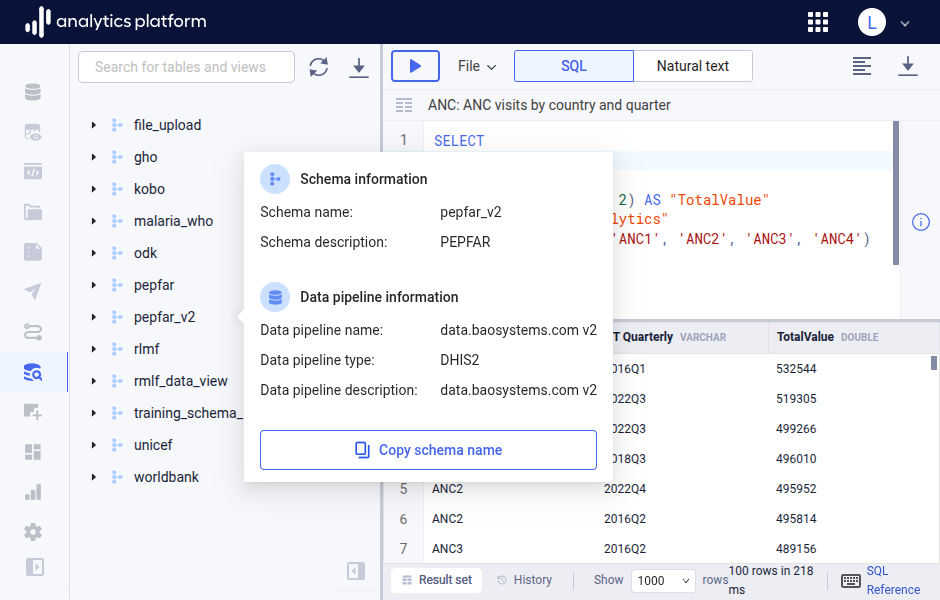
Query explanation in Markdown
In data browser, for the right side panel, a user can read an explanation of the query in the query area. The explanation is now formatted as Markdown.
Why it's useful: Markdown provides a better reading experience compared to unformatted text.
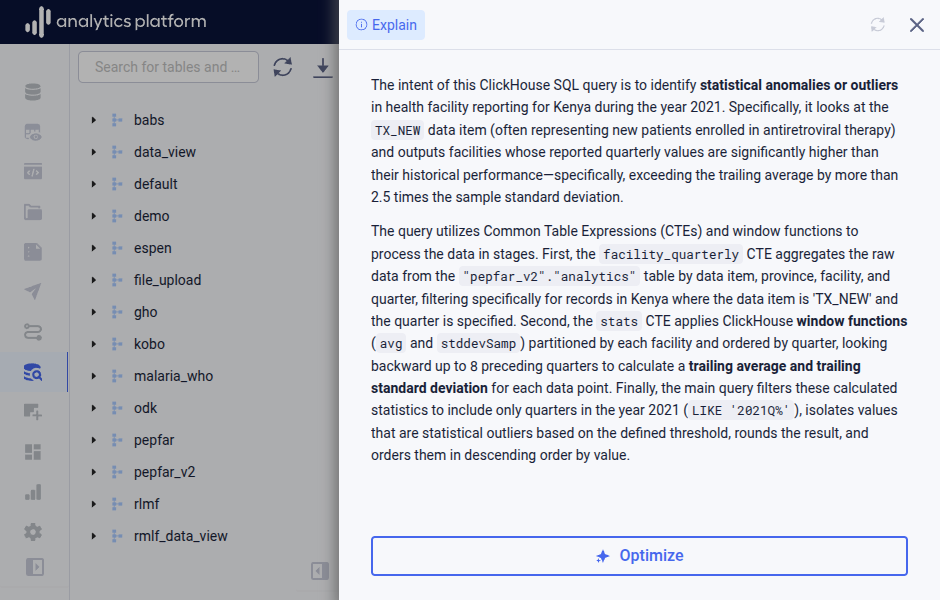
1.0.1700
Build time: 2026-09-21 07:04:35 ○ Git commit: d0f1677f4c45ca1ade1d1b14c5272038db3e3619
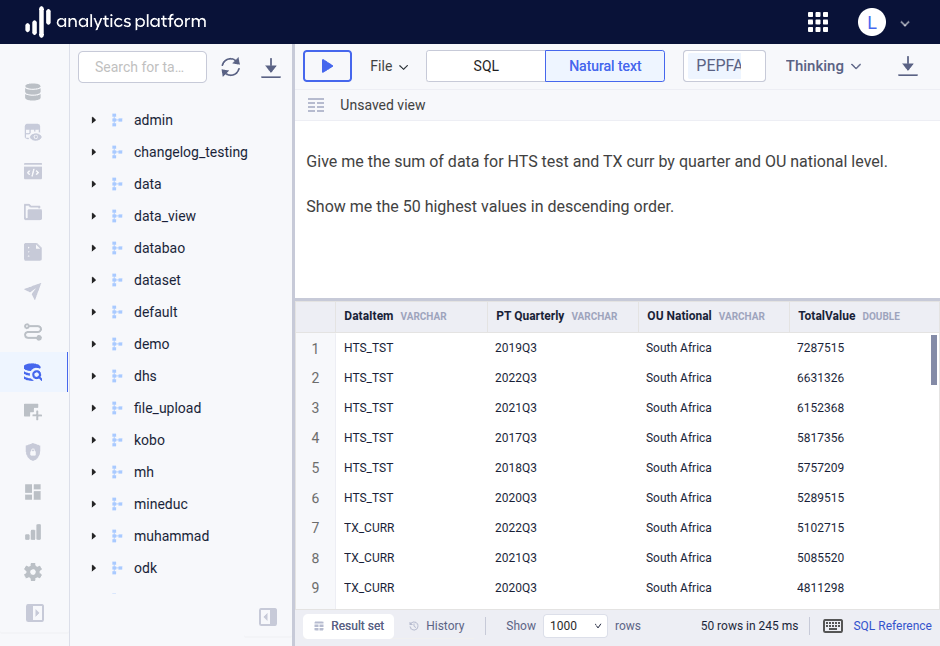
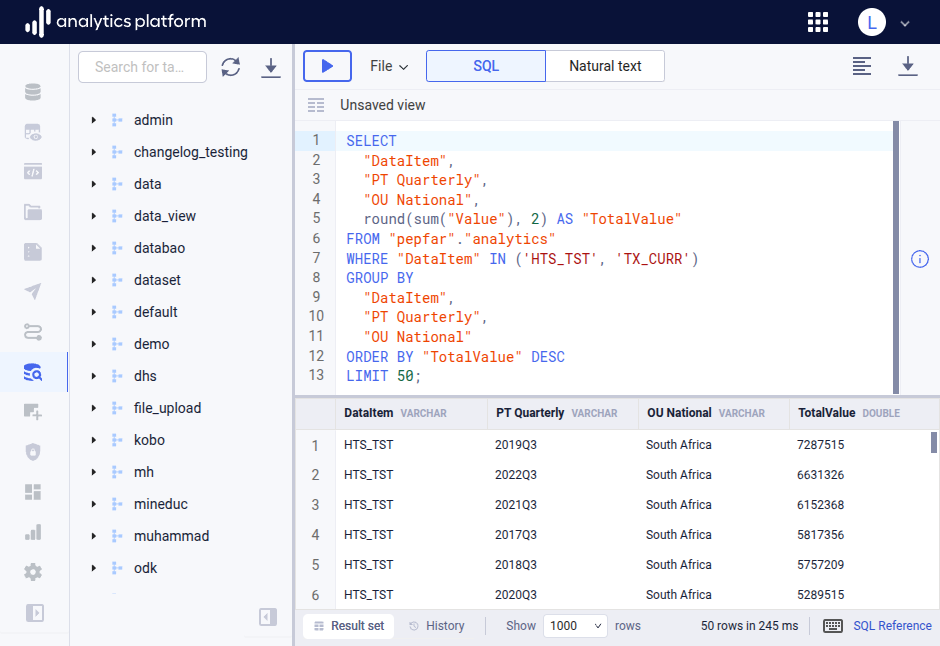
Semantic phrase search
In the data browser, for natural text queries, semantic phrase search for DHIS2 metadata including data elements and org units is now supported for ClickHouse and Azure SQL Database. The semantic search is based on vector embeddings and cosine similarity search. To store vector embeddings, ClickHouse uses an Array(Float32) column while SQL Database uses a vector(n) column.
Why it's useful: The embeddings-based semantic search for natural text queries allows for identifying data elements and org units for DHIS2 by semantic similarity, avoiding the need to specify exact names or identifiers.
ClickHouse data pipeline
A new data pipeline type for ClickHouse is introduced. The data pipeline connects to ClickHouse using the JDBC driver and allows for loading data with a SQL query or by replicating entire tables.
Why it's useful: The new data pipeline allows for loading data from other ClickHouse data warehouses.
Nullable column data types setting
A new client setting for "Nullable column data types" is introduced. The setting applies to ClickHouse only, for which the default behavior is to not allow null values in data warehouse tables and instead use default values. When enabled, null values, meaning no data/missing data, are allowed.
Why it's useful: Data analysts may want to distinguish between zero values and null / missing values. Allowing null values comes with a performance overhead in ClickHouse, so introducing a setting allows for deciding on the performance vs business logic trade-off.
Embeddings retry handling with exponential back-off
When generating vector embeddings as part of a DHIS2 data pipeline run, if embeddings requests to Google Gemini hit the tokens per minute or requests per minute limits, the data pipeline will retry for up to 5 minutes using exponential back-off.
Why it's useful: In a multi-tenant environment, data pipelines hitting the Gemini API limits will happen, and retries allow for the embeddings generation to either finish or fail gracefully.
Admin reports
A set of admin reports for workflows, data pipelines and destinations is available.
Why it's useful: Administrators can quickly get an overview of workflows, data pipelines and destinations in a failed state.
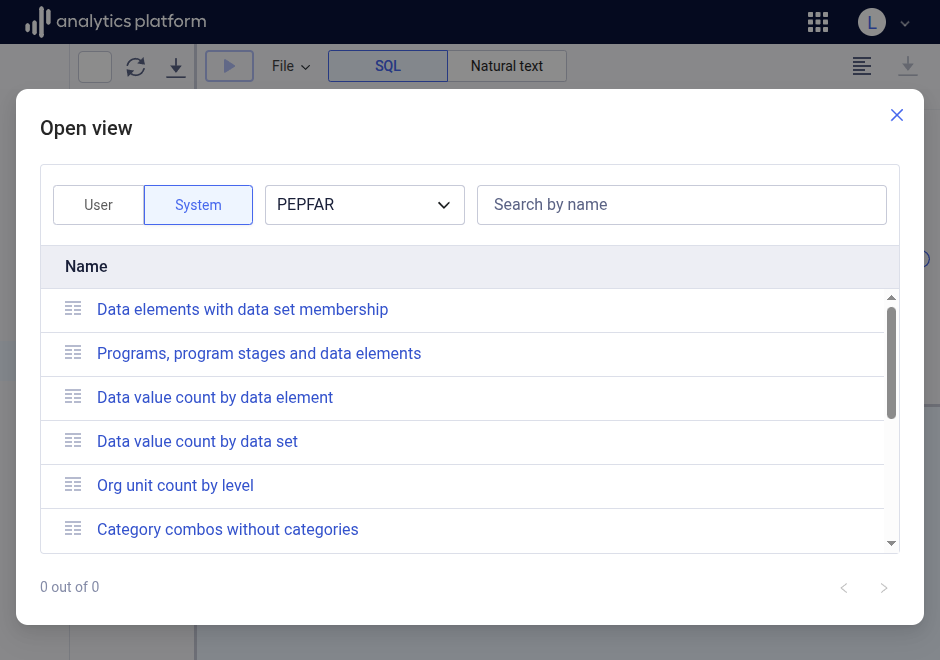
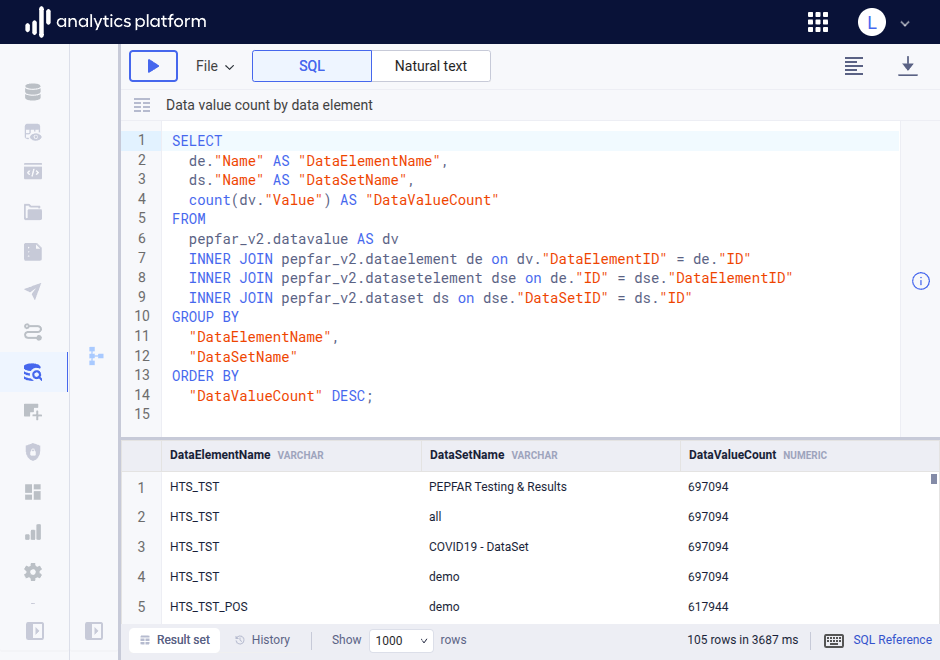
System views
A new concept of "system views" is introduced in the data browser. System views are general, built-in views which are relevant for a data source schema. A "data source schema" is a schema for a specific data pipeline, such as a DHIS2 data pipeline, where all tables in the schema are created by the data pipeline.
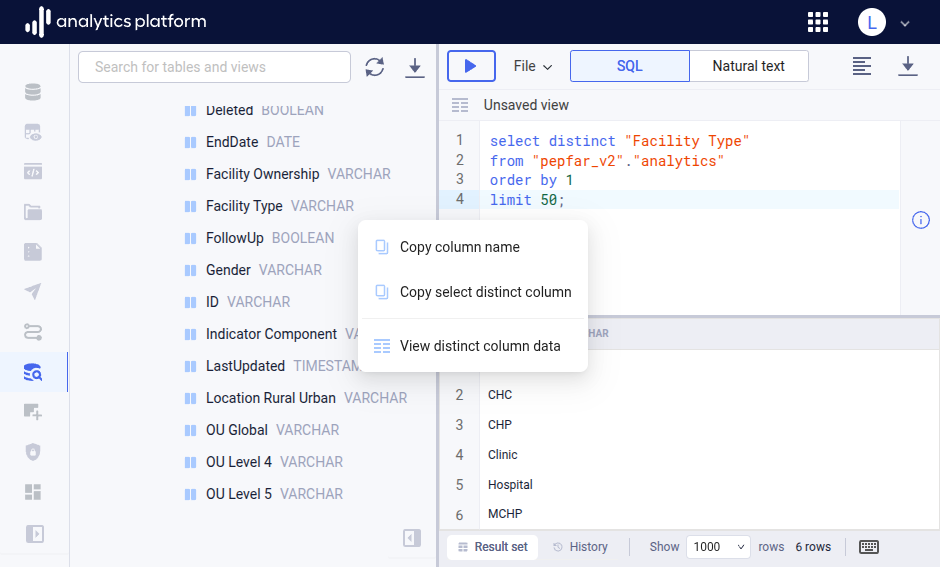
View distinct column data
The schema navigator in the data browser has new column operations for View distinct column data and Copy select distinct column.
Why it's useful: This function allows for quickly viewing unique values of a particular table column when writing SQL queries.
Log data load queries
A new client setting is available for logging SQL queries that are part of data load processes.
Why it's useful: Logging of SQL queries simplifies troubleshooting by providing direct access to queries which may have failed.
Thread pool for continuous jobs
A new internal thread pool dedicated to continuous data loading jobs is introduced.
Why it's useful: It allows continuous data load jobs to run at night without being deprioritized by long-running full refresh jobs.
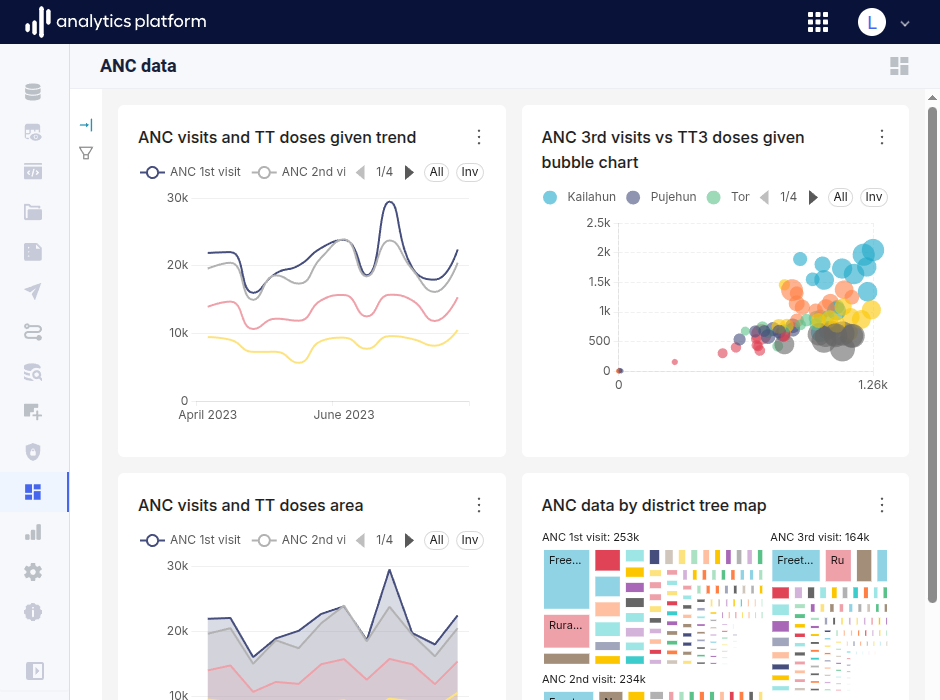
Integrated Superset dashboards
Superset dashboards are now integrated and embedded within the AP web interface. Navigate to the Superset dashboards page by clicking the Dashboards item in the left-side menu. Select the dashboard to view from the dashboards icon in the top-right corner.
Why it's useful: End users can view Superset dashboards within the AP web UI and don't have to navigate to Superset to view dashboards.
Metadata autocomplete in data browser
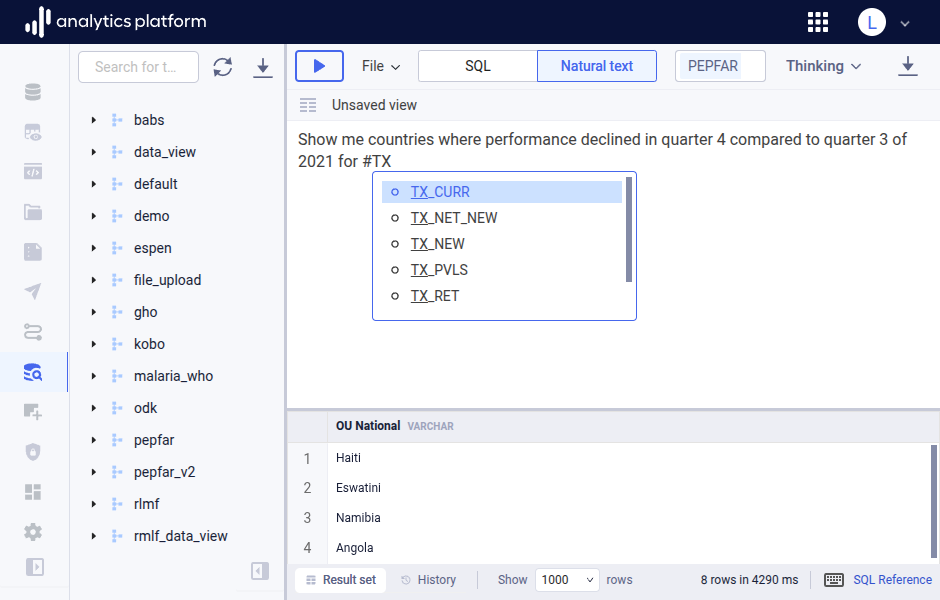
When in natural text mode in data browser, when a schema for a DHIS2 instance is selected, autocompletion for data elements, data sets and org units is available. Type the # character to trigger autocomplete, which will search for DHIS2 data elements, data sets and org units which match the text entered after the # trigger.
Data loading performance
Two major improvements are introduced for data loading performance. For DHIS2 data pipelines, when loading data, data files for aggregate data values and events are now written in up to 4 parallel threads per data load process. This leads to better utilization of available CPU cores and makes data file writing about 2x faster.
For ClickHouse, when loading data, data files are written using the zstd compression algorithm, which compresses data up to 10x faster than the previously used gzip. This makes data file writing considerably faster.
Include change log tables for DHIS2
A new setting is introduced for the DHIS2 data pipelines with label "Include change log tables", which controls whether change log tables for event and enrollment tables are included. Existing data pipelines are upgraded with the setting enabled, while the default for new data pipelines is disabled.
Why it's useful: In many cases, the change log tables grow very large and are not used for analytics, and excluding them improves data load times.
Script editor file menu
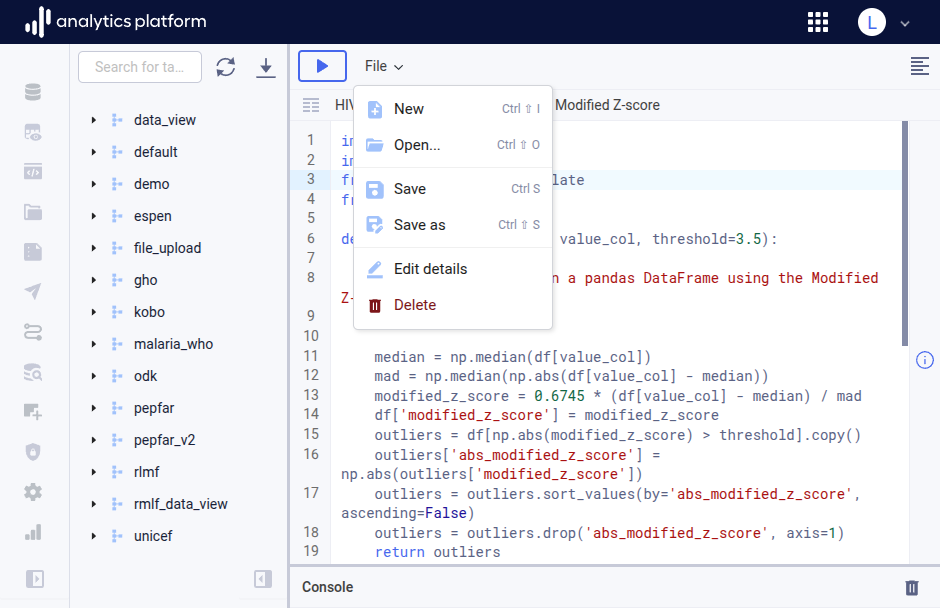
The script editor has a new File menu which makes working with scripts much easier. Click the File menu button from the top menu bar to open the dialog. Click New, Save as, Save, Edit details and Delete to perform the respective operations.
Why it's useful: The new File menu allows for a more natural workflow where you first write the script, then save it. It means you can manage scripts without having to leave the script editor.
Text-to-SQL option values
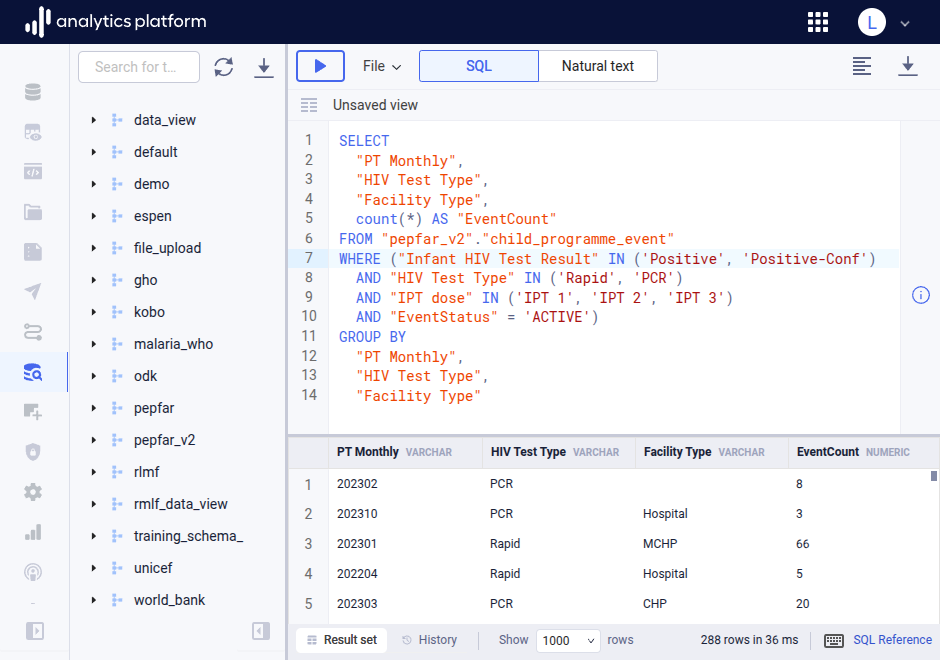
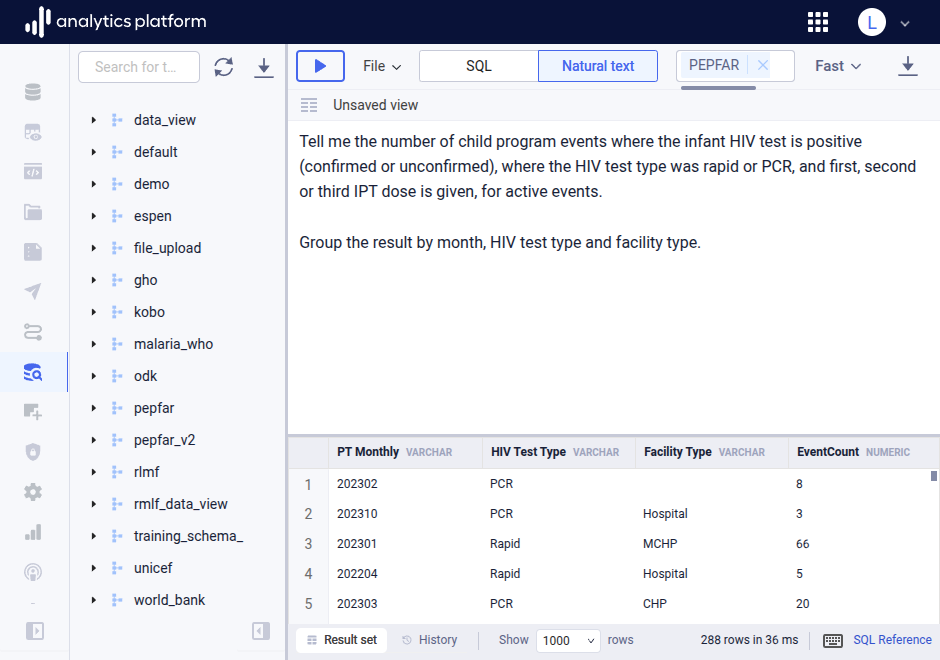
For DHIS2 properties of enum type (example: EnrollmentStatus with enum values ACTIVE, COMPLETED, CANCELLED) and for data elements and tracked entity attributes with option sets, the option values are now part of the text-to-SQL LLM instruction.
Why it's useful: The text-to-SQL engine is able to use the correct option value for the mentioned columns in SQL. This removes the need for looking up and specifying exact enum and option set values.
Data browser file menu
Data browser has a new file menu which makes working with views (saved queries) a lot easier. Click the File menu button from the top menu bar to open the dialog. Click New, Save as, Save, Edit details and Delete to perform the respective operations.
Why it's useful: The new File menu allows for a more natural workflow where you first write the SQL query, then save it. It means you can manage queries (views) without having to leave the data browser page.
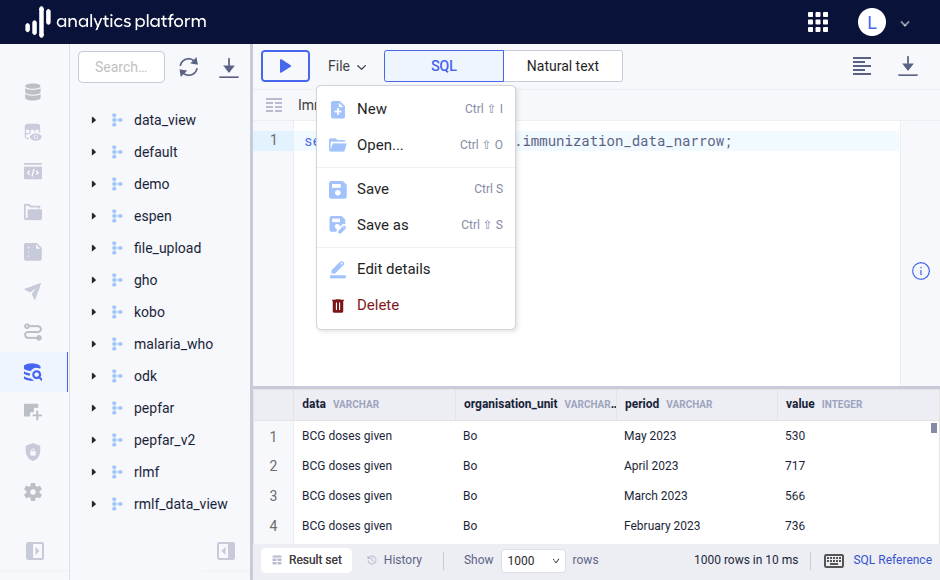
Data browser responsiveness improvements
The data browser top menu is now more compact. The execute query button is moved to the left and uses an icon only. The thinking mode, download and format buttons are smaller and consistent with the AP UI. The name of the active view is displayed in a bar below the top menu bar. The schema navigator right side panel can be collapsed by clicking the collapse icon at the bottom.
Why it's useful: The new layout allows for using data browser on laptops with lower resolutions and makes the UI more consistent with other query editors.
Phrase expansion for data elements
In natural text mode, data browser now supports phrase expansion when resolving data elements from natural text prompts. For example, data browser will resolve the prompt "Give me the sum of antenatal first, second and third visits" into three data elements "antenatal first visits", "antenatal second visits", "antenatal third visits".
Why it's useful: Users no longer have to specify the exact names of data elements in natural text queries.
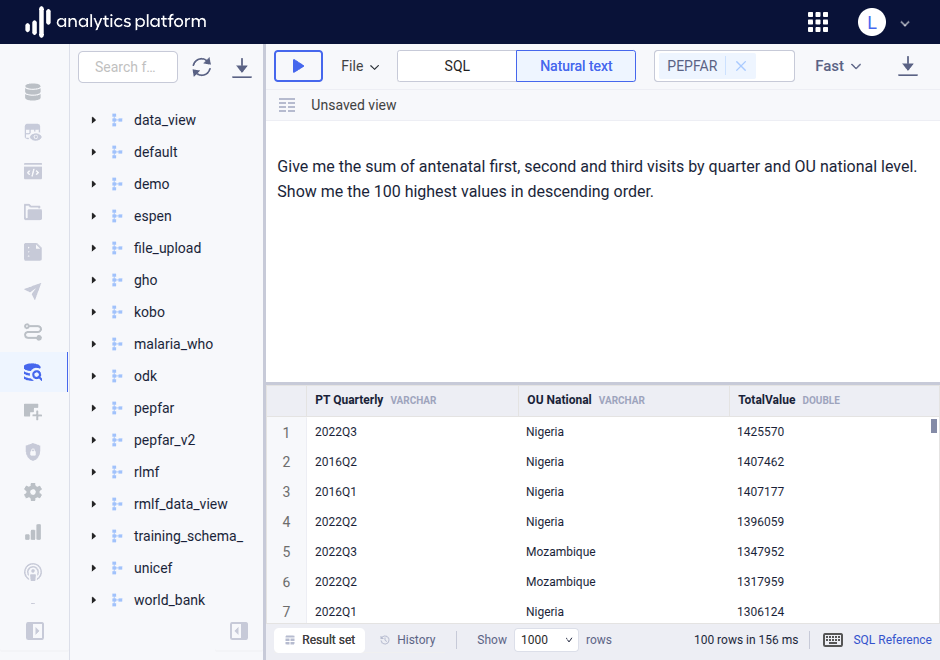
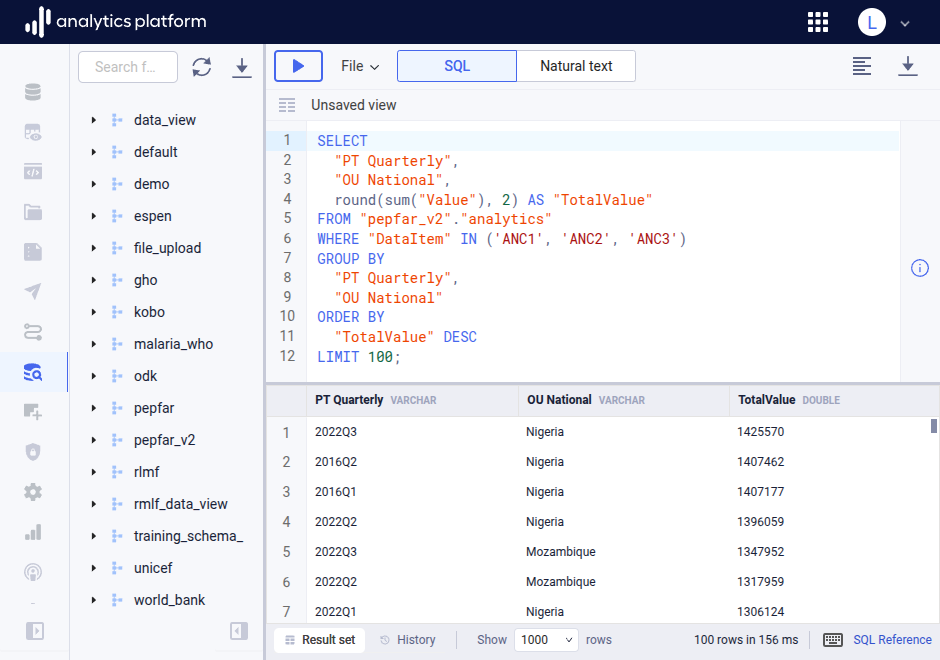
Data element context for text-to-SQL
The text-to-SQL solution for Data browser got a lot smarter. For a natural text query, AP will identify exact data element names from the natural text prompt. The process is:
- AP generates embeddings (vectors) for data element names/short names/codes using Gemini/OpenAI as part of the DHIS2 data pipeline, and stores the embeddings in a table called
metadata_embedding. - For incoming natural text queries, "phrases" which describe data elements are identified from the user text query, for example "individuals receiving antiretroviral therapy".
- For each phrase, AP will create an embedding and use it to query the
metadata_embeddingtable with a cosine similarity order to identify the data elements which are relevant for the phrase. - Relevant data element names are included with the system instructions to the LLM for text-to-SQL conversion.
Why it's useful: The user does not have to specify exact data element names in the natural text query, and can instead describe the type of information to retrieve and have AP identify the data elements.
Complete data set registration DHIS2 destination type
For DHIS2 destinations, a new type for complete data set registrations is available.
Why it's useful: We can now use SQL queries and Python scripts to express logic to complete data sets in DHIS2.
AP Java client
A Java client for AP is now available. The Java client is open-source licensed and available from Maven Central repository. Link to Git repo. Link to Maven repo.
Why it is useful: Clients can now query AP metadata and data, both with SQL and natural text, from external services.
Fast and thinking reasoning level for scripts
Reasoning level is introduced to the Python and R scripting editor and the natural-text-to-script solution. The text-to-script dialog is found in the right-side panel of the script editor and the reasoning level is found next to the text input field.
Why it's useful: The thinking level allows for creating sophisticated scripts with direct access to the data warehouse, and performing complex tasks such as machine learning-based data forecasting.
DHIS2 indicator queries
The text-to-SQL solution now has context for how to replicate basic DHIS2 indicators directly in the data browser from natural text input.
Why it's useful: Superset users can now replicate DHIS2 indicator expressions in SQL without having to pre-compute indicator values.
Snowflake as data warehouse
Snowflake is now supported as a data warehouse provider in AP.
Why it is useful: Organizations which use Snowflake as their data warehouse can now integrate and utilize AP.
Public data portals
New data pipelines for WHO Global Health Observatory (GHO), UNICEF Data and World Bank Data Portal are introduced. The UNICEF data pipeline is based on the SDMX standard, and can be used as a basis for building data pipelines for other SDMX-based data portals.
Why it is useful: Organizations can now correlate their internal data with global data and trends and improve data forecasting by integrating with global datasets.
Fast and thinking reasoning level
Reasoning level is introduced to the data browser natural text-to-SQL solution. The level is selected from a drop-down in the top bar. For Google Gemini, when set to Fast, a Flash-Lite model with low thinking level is used; when set to Thinking, the Flash model with low thinking level is used.
Why it's useful: For complex SQL queries, like cohort analytics and outlier detection, where a slight increase in time and token usage is appropriate, you can set the reasoning level to Thinking and have AP create complex SQL queries based on natural text input. This really allows for creating complex queries with natural text and this has potential for making our project delivery faster. Looking forward to feedback from implementers.
Azure Entra ID SSO
Microsoft Azure Entra ID is supported as a Single Sign-On (SSO) identity provider.
Why it's useful: Organizations using the Azure cloud can now integrate AP using their existing identity provider.
Dedicated data pipeline schemas
When creating new data pipelines, for example for DHIS2 or CommCare and other multi-table data pipelines, the UI now encourages you to create a new, dedicated schema for the data pipeline tables. With dedicated schemas, the table base name is no longer needed.
Why it's useful: This encourages a cleaner data warehouse design, and makes the text-to-SQL engine more effective. The absence of a table base name makes the table names more intuitive and cleaner.
ClickHouse JSON column data type
AP now maps PostgreSQL JSON(B) columns to ClickHouse JSON columns.
Why it's useful: Dot-notation and other powerful ClickHouse JSON functions can be used in SQL views, making it easy to make JSON data fields accessible in BI tools.
Usage statistics for DHIS2
The DHIS2 data pipeline now includes DHIS2 usage statistics, including how many times particular visualizations and dashboards are viewed.
Why it's useful: Users can now create dynamic analytics and dashboards in BI tools for DHIS2 usage.
Schema download
In the schema navigator in the data browser, you can now download the entire data warehouse schema, meaning schemas, tables and columns. The supported formats are JSON, Markdown and DDL SQL statements.
Why it's useful: You can now easily replicate, share and visualize the data warehouse schema.
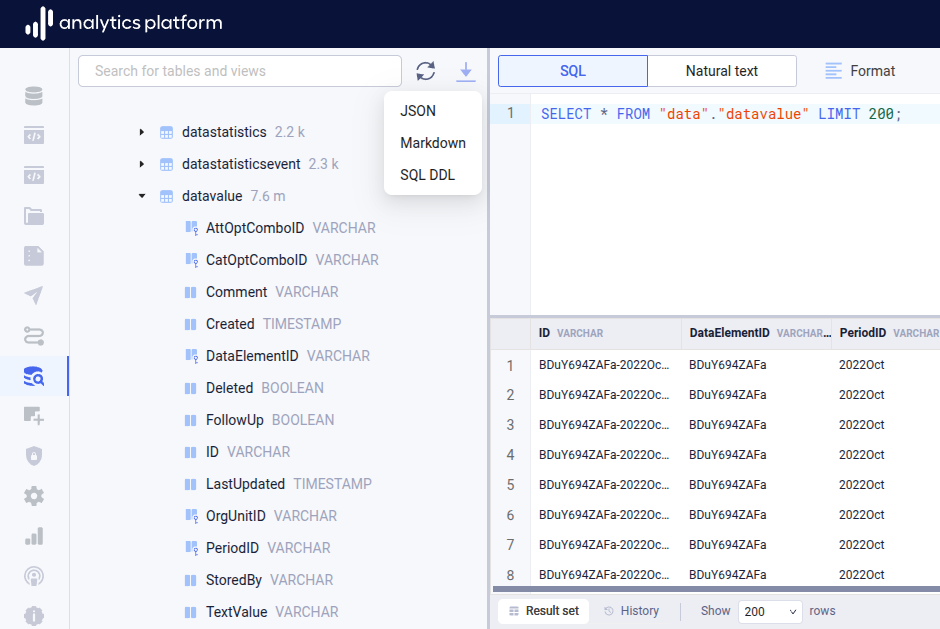
Schema table create SQL DDL action
In the schema navigator in the data browser, you can now get the SQL statement to create a particular table.
Why it is useful: You can now create a new table based on an existing table with a few modifications, and pass the table definition to an external LLM to get help with SQL queries.
MCP server
AP now features an MCP server for use by AI-powered data agents. There are tools available for natural text-to-SQL queries and for retrieving metadata from DHIS2, and resources for retrieving data warehouse schema information.
Why it is useful: The MCP server can be used as a basis for data agents and other AI tools.
Foreign keys in data browser schema
In data browser > schema navigator, if a column has a foreign key, a key icon is displayed next to the column name. You can hover over the key icon to see which table and column the foreign key refers to.
Why it's useful: This makes it easier to write SQL queries manually in cases where you need to join several tables, and helps the text-to-SQL/LLM to write SQL queries from natural text, as the foreign key information is provided as part of the LLM context.
Notifications and alerts
A new system for user notifications and alerts for data quality violations is available. Notifications can be sent for data quality checks and are associated with data quality check groups. Checks can be scheduled to run as part of workflows.
Why it's useful: Notifications for failed data quality checks allow for timely handling of data quality issues.
Query explanation
In data browser, after opening a SQL query, a user can now open the right-side panel and get a plain text explanation of the intent and logic of the query.
Why it's useful: This allows SQL writers to understand complex queries written by others.
Python scripting
AP now provides an integrated Python scripting editor. Scripts can be created and managed from the Scripts item in the left-side menu. The script editor supports code highlighting and auto-completion. A connection to the data warehouse is provided by a built-in Python function.
Python script computation happens in a dedicated VM per client. Python scripts can be scheduled as part of workflows, as jobs within steps.
Why it's useful: Data analysts can write Python transformations as part of a multi-step workflow, to perform data science including machine learning, predictions and modelling.